The 2026 Role-to-Device Matrix: Stop Wasting Money, Start Boosting Productivity

Remember the great hardware scramble of 2020? IT teams worked miracles, shipping anything with a keyboard to keep the lights on. But now, years into hybrid work, we’re dealing with the hangover: a jumbled fleet of mismatched devices. Power-hungry laptops sit idle on home desks, while your creative team grinds through renders on underpowered machines. This isn't just an IT headache—it's a silent budget leak and a daily drag on productivity.
The fix isn't asking for more money; it's spending what you have wisely. That’s where the 2026 Role-to-Device Matrix comes in. Think of it as your blueprint to swap a reactive, one-size-fits-all model for a smart, intentional hardware strategy. This guide will walk you through grading your devices, matching them to real work needs, and building a scalable plan that cuts costs and actually supports how people work.
1. Why "One Size Fits All" Is Killing Your Budget
Handing out the same premium laptop to everyone feels fair, but in 2026, it’s a fast track to wasted spend.
The Overkill Tax: Issuing a $2,500 mobile workstation to someone who lives in a browser and a CRM is like using a sports car for errands. You’re paying for horsepower that never gets used, tying up cash that could fund real innovation.
The Hidden Cost of "Not Enough": The opposite problem is worse. Giving a data scientist or video editor a mid-tier laptop creates constant friction. Rendering drags, apps stutter, and multitasking fails. This isn't a minor annoyance—it’s measurable productivity loss, security risks from aging gear, and a sure way to frustrate your top talent.
Hybrid Work Makes It Worse: When your team is dispersed, these mismatches are harder to see and more painful to feel. IT can’t walk over and see the struggle, and employees feel stuck with inadequate tools. The result? A spike in support tickets, remote troubleshooting nightmares, and lost hours.
2. The 2026 Device Grades: A, B, C, Decoded
Move beyond "cheap" vs. "expensive." Think about what the work actually requires.
Grade A (The Power Tool): Built for computational heavy-lifting. We’re talking high-end CPUs (Intel Core i9/AMD Ryzen 9, Apple M3 Max), dedicated pro-grade GPUs, 32GB+ RAM, and superb displays. This isn’t about prestige; it’s for the intense, specific tasks: machine learning, 8K video editing, complex simulation, and advanced 3D modeling.
Grade B (The Reliable Workhorse): The sweet spot for most of your team. Specs like a mid-tier processor (Intel Core i5/i7, AMD Ryzen 5/7, Apple M-series), 16GB of RAM, and integrated graphics. This grade effortlessly handles the core toolkit: the full Office 365 or Google Workspace suite, CRM platforms, video calls with 20+ tabs open, and light creative work.
Grade C (The Specialist): Designed for a specific, focused job. These devices have entry-level processors, 8GB RAM, and are often cloud-first or built for durability. They’re perfect for call center agents (thin clients), point-of-sale systems, kiosks, or roles that truly only need a browser. Their value is in low total cost, rock-solid reliability, and easy management.
3. Build Your Own Matrix: A Practical Guide
Here’s how to turn this framework into action.
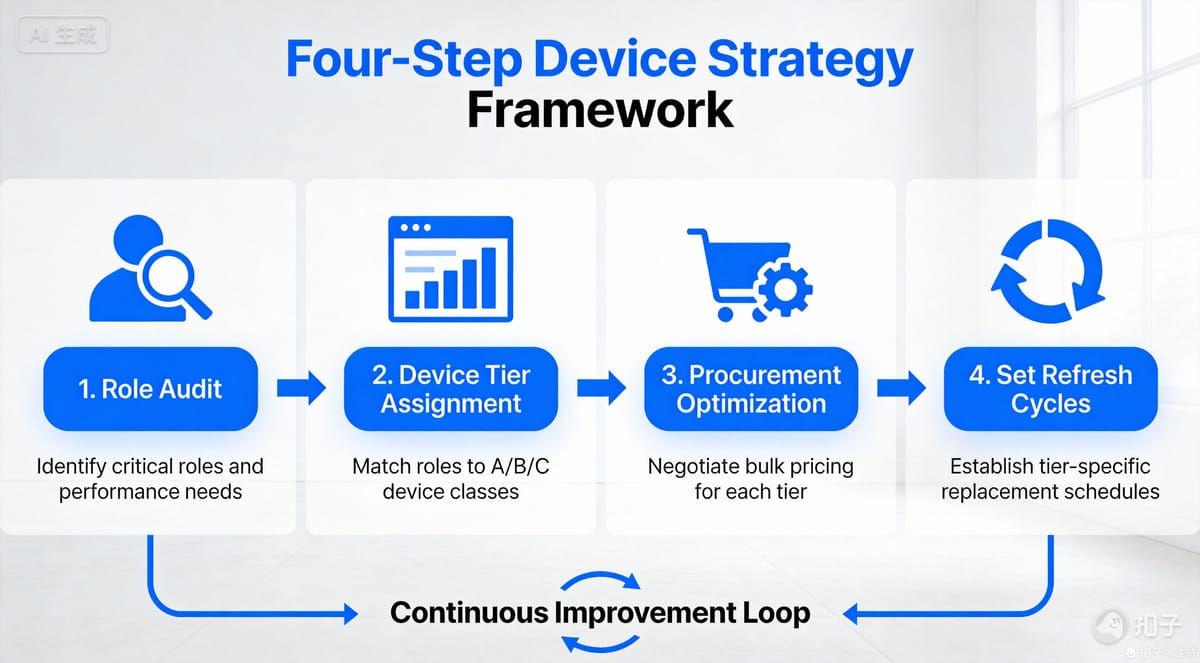
Step 1: Audit Roles by Need, Not Title
Look at what people do, not what they’re called. Profile each role based on:
- Core Applications: Is their day in Figma, Excel, a proprietary database, or a browser?
- Data & File Needs: Do they work with massive datasets, huge video files, or mostly documents?
- How They Work: Fully remote, in-office, or hybrid? How critical is portability?
- Security Profile: Do they handle sensitive IP, financial data, or customer info?
Step 2: Map the Real Hardware Needs
For each role, define two specs: the bare minimum to function and the optimal setup for smooth, frustration-free work. The gap between them reveals your savings and satisfaction opportunity.
Step 3: Build Your Single Source of Truth
Create a clear, shared matrix. For example:
| Role Category | Device Grade | Key Justification & Typical Specs |
|---|---|---|
| AI Developer, Senior Video Editor, CFD Analyst | A | Local processing of massive files/models. High-end CPU (Intel Core i9/AMD Ryzen 9/Apple M3 Max or better), professional-grade discrete GPU (NVIDIA RTX / AMD Radeon Pro), 32GB+ RAM, pro-grade calibrated display. |
| Marketing Manager, Software Developer, Sales Executive, Financial Analyst | B | Heavy multitasking across productivity suites, IDEs, CRMs, and data analysis tools. Mid-tier CPU (Intel Core i5/i7, AMD Ryzen 5/7, Apple M2/M3), 16GB RAM, integrated or entry-level discrete graphics, high-quality webcam & microphone. |
| Call Center Agent, Data Entry Clerk, POS/Kiosk Operator | C | All-day work within a single cloud platform or dedicated terminal application. Entry-level CPU (Intel Core i3, AMD Ryzen 3, Apple M1), 8GB RAM, SSD, durable/ergonomic design, optionally ruggedized or thin-client. |
| Research Scientist (Data-Intensive), Architectural Renderer | A | Running complex simulations, 3D renders, and large dataset analysis. Requires top multi-core CPU, professional GPU (e.g., NVIDIA RTX A-series), 64GB+ RAM, large-capacity high-speed NVMe storage. |
| Product Manager, HR Business Partner, Content Writer | B | Core office suites, collaboration tools, medium-weight project management software, and continuous video conferencing. Mid-tier CPU, 16GB RAM, 512GB+ SSD, long battery life, 14-16" premium display. |
| Field Service Technician, Warehouse Scanning Clerk | C | Running specialized field apps or browser-based systems, often in non-office environments. Requires ruggedness, all-day battery life, barcode/RFID integration; specs can be entry-level CPU with 8GB RAM. |
| Junior Graphic Designer, Data Engineer | B (leaning toward A) | Working with medium-weight PS/AI files or ETL/data pipeline workloads. Recommend higher-performance CPU (i7/R7), 32GB RAM, mid-to-high discrete GPU (e.g., RTX 4060/4070) for smooth creative work and data processing. |
| Executive Leadership, Strategic Consultant | B (Focus: Experience & Security) | Heavy external meetings, strategic analysis, handling sensitive information. Requires premium business laptops (e.g., Dell XPS, Lenovo ThinkPad X1) with top-tier display/audio and hardware security chips (e.g., TPM 2.0) for premium experience and security. |
| Legal & Compliance Officer | B (Focus: Security & Storage) | Handling large volumes of confidential documents and audit trails. Requires mid-to-high CPU, 16-32GB RAM, hardware-encrypted storage, enhanced endpoint and data security features. |
| Administrative Assistant, Receptionist | C | Primarily uses email, calendar, document management, and booking systems. Entry-level CPU, 8GB RAM, 256GB+ SSD, optionally all-in-one or mini-PC form factors to save space. |
(This matrix is an example; tailor it to your organization's specific tools, workflows, and security requirements.)
Step 4: Set Smart Refresh Cycles
Not all devices age at the same rate. Grade A machines, running hot, might be on a 3-year cycle. The stable, less-taxed Grade C devices could last 4-5 years. This tiered lifecycle approach stretches your budget further.
4. The Payoff: More Than Just Savings
Getting this right creates a ripple effect of benefits:
- People Actually Enjoy Their Work: The right tool removes daily friction. Say goodbye to the chorus of "my computer is so slow."
- Your Budget Works Smarter: Savings from right-sizing the B and C tiers can fund innovation—like cutting-edge Grade A gear for your innovators—or new software tools.
- You’re Ready for What’s Next: This matrix is a living document. When a new role emerges or a tech shift happens (hello, on-device AI), you can plug it in without starting from scratch.
- Security Gets Sharper: You can mandate top-tier security features (like hardware-based encryption) for high-risk roles without wasting them on low-risk ones.
5. Gearing Up for 2026: AI, Choice, and Sustainability
Your matrix needs to be adaptable. Here’s what’s on the horizon:
- The AI Hardware Shift: As AI becomes part of everyday apps, some roles may need specialized chips (NPUs). Be ready to define an "A+" tier or bump your A/B specs.
- The Employee Choice Balance: Flexibility doesn't mean free-for-all. Offer curated choice within a grade: "For your B-grade role, here are three excellent, vetted laptops that meet our performance and security bar."
- Sustainability as a Strategy: A graded approach is inherently greener. Extending the life of durable C-grade devices reduces e-waste, aligns with ESG goals, and improves your total cost of ownership.
Conclusion: From Cost Center to Productivity Engine
The 2026 Role-to-Device Matrix isn't just a purchasing list. It's a strategic framework that transforms IT from a reactive fixer into a proactive architect of how work gets done. It ensures every hardware dollar is a direct investment in productivity and people.
Your Next Step: Don't let hardware chaos linger. Next quarter, pick just one department. Audit their roles and map them to the A/B/C grades. The clarity—and potential savings—you’ll find will be the proof you need to build a smarter, more resilient operation for the future.
📥 Ready to start? Grab our free, customizable 2026 Role-to-Device Matrix Worksheet.
📖 Dive Deeper: For the financial playbook, read our next piece: "IT Budget Alchemy 2026: Turning Device Grades into Tailored Productivity."